
Just a few years ago, working remotely from a camper van or an off-grid cabin meant constantly playing the “cellular lottery.” You’d pull into a beautiful, isolated spot, hold your phone up to the sky, and pray for two bars of LTE so you could send a single email. If you had an important Zoom call, you were probably driving back into town to sit in a coffee shop parking lot.

Those days are officially over.
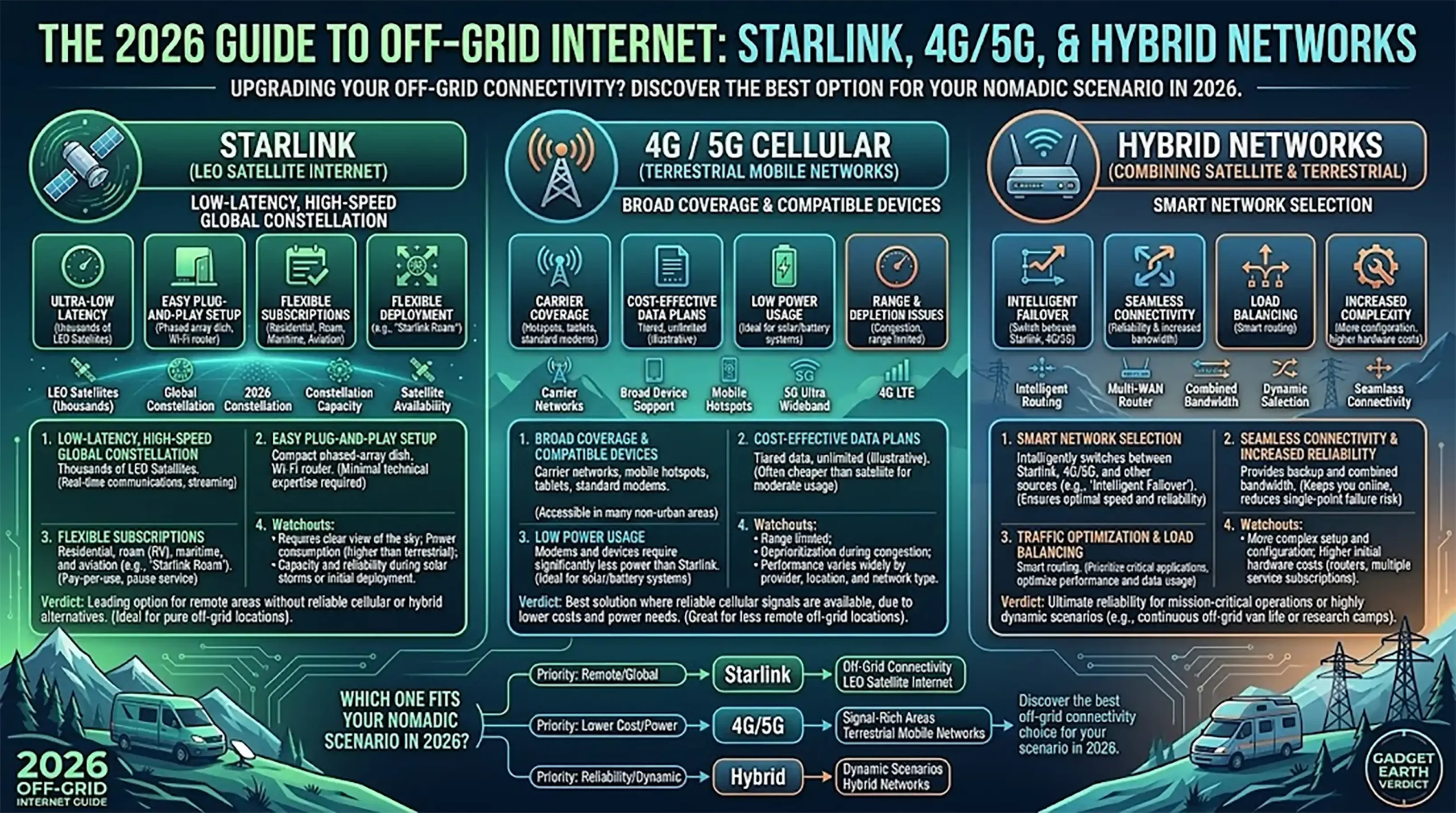
Thanks to the rapid expansion of Low Earth Orbit (LEO) satellite constellations and non-terrestrial networks, 2026 is the year we stop compromising on connectivity. But the ultimate off-grid internet setup isn’t just about bolting a satellite dish to your roof. It is about building a system that is smart, redundant, and power-efficient.
If you want bulletproof off grid wifi this year, here is your blueprint for combining Starlink and 5G into an unstoppable hybrid network.
While combining cellular hotspots and Starlink satellite systems is an exceptional baseline, consolidating local hotel connections inside your workspace is equally important. Read our newly published guide to the best travel routers for digital nomads to see how to bypass device caps and captive portals completely offline.
The Hybrid Network Strategy: Why Choose When You Can Combine?
If you ask a group of digital nomads what the best internet source is, half will say cellular (4G/5G) and half will say satellite. The truth? They are both right, and relying on just one is a rookie mistake.
Cellular is great because it uses very little battery power, but it disappears the second you drive into a canyon. Off-grid satellite internet gives you global coverage, but thick tree canopies or heavy rain can knock it offline.
Enter the hybrid networks.
Instead of manually switching between a cellular hotspot and your Starlink, you use a smart, dual-WAN router (like a Peplink or Cradlepoint). You plug both your satellite connection and a 5G SIM card directly into this “brain.”
You can configure these routers in two incredible ways:
- Failover Mode: You set your low-power 5G connection as the primary network. The second you lose cell service, the router automatically wakes up your Starlink and switches over without dropping your video call.
- Bonding: The router actually merges the satellite and cellular signals together into one super-connection, giving you maximum upload speeds and ultimate stability.
Energy Budgets: Taming the Power Hog
We need to address the elephant in the room: Starlink off grid power consumption.
While a standard 4G hotspot sips a measly 2 to 5 watts of power, a modern LEO satellite dish is thirsty. A standard or mini Starlink dish will pull anywhere from 25 to 40 watts continuously while active. Over a 24-hour period, that single piece of hardware can easily chew through 600 to 900 watt-hours of your battery bank. If you have a smaller solar setup, your internet will literally drain your house batteries.
Here is the 2026 playbook for managing that energy drain:
- Ditch the Inverter (Go DC-to-DC): Out of the box, Starlink uses a standard AC wall plug. This means your 12V battery has to convert power to 110V AC, and the Starlink power brick converts it back to DC. This double-conversion wastes about 15% to 20% of your power. By using a 12V DC step-up converter to wire the dish directly to your fuse block, you instantly reclaim that wasted energy.
- Automate Sleep Schedules: You don’t need internet while you are asleep. Dive into your app settings and schedule the dish to sleep from midnight to 6 AM. In sleep mode, the power draw drops to just 1 or 2 watts.
Installation & Heat Management
Hardware is getting smaller, which means more people are flat-mounting their satellite dishes directly to the roofs of their vans, RVs, and overlander rigs.
Flat-mounting (disabling the motors so the dish faces straight up) is aerodynamic and means you don’t have to set up a tripod every time you park. However, it introduces a massive enemy: heat.
RV roofs bake in the summer sun. If your dish gets too hot, it will automatically throttle its speeds or shut down entirely to protect its internal circuitry.
Pro-Tips for a Cool Installation:
- Never mount directly flush. Always use raised brackets that leave at least a one-inch air gap beneath the dish so wind can channel through and cool the underside.
- Avoid dark surfaces. If your roof is black or dark grey, consider adding a patch of white elastomeric reflective paint specifically under the dish area.
- Keep the router inside. While the antenna is built to withstand the elements, keep your smart router safely inside your climate-controlled cabin to prevent overheating.

- Starlink Mini Round Adapter:Constructed from aluminum alloy, it lightweight 0.181 lbs with a maximum diameter of 2.05 inch,top surface features a standard 1/4″-20 threaded screw hole for installing su…
- Super Clamp Mount:Materials are alloy and reinforced nylon composite, as solid as rock,drop-resistant and durable,secure to hold starlink mini device without slipping,all screw accessories are made fr…
- Flexible Adjustment: with a dual ball head design for magic arm mount,twisting knob to unlock ball heads,both can 360° rotation and 90° tilt freedom,allowing to flexible adjustable position of starlin…
The Bottom Line
You no longer have to choose between exploring the wild and staying connected to your life, work, and family. By pairing the deep-woods reach of satellite tech with the low-power efficiency of 5G, you can build a 2026 hybrid setup that just works—wherever the road takes you.
Pingback: Best Travel Routers For Digital Nomads And Remote Workers - GADGET EARTH